Draw outside the lines.
the inbox trick

Your inbox, tamed.
By you, in one evening.

There is a hyped AI email tool you have seen the ads for. I did not buy it. I rebuilt it locally with Claude Code, then kept adding layers the tool does not have. This is the exact framework: five layers, six prompts, one master build prompt.

No SaaS in the middle, no third party with access to your mailbox. The only thing that ever leaves your machine is the model calls you send yourself. Nothing auto-sends; every reply waits as a draft until you hit send.

One-time. First layer runs tonight. 30-day no-questions refund.
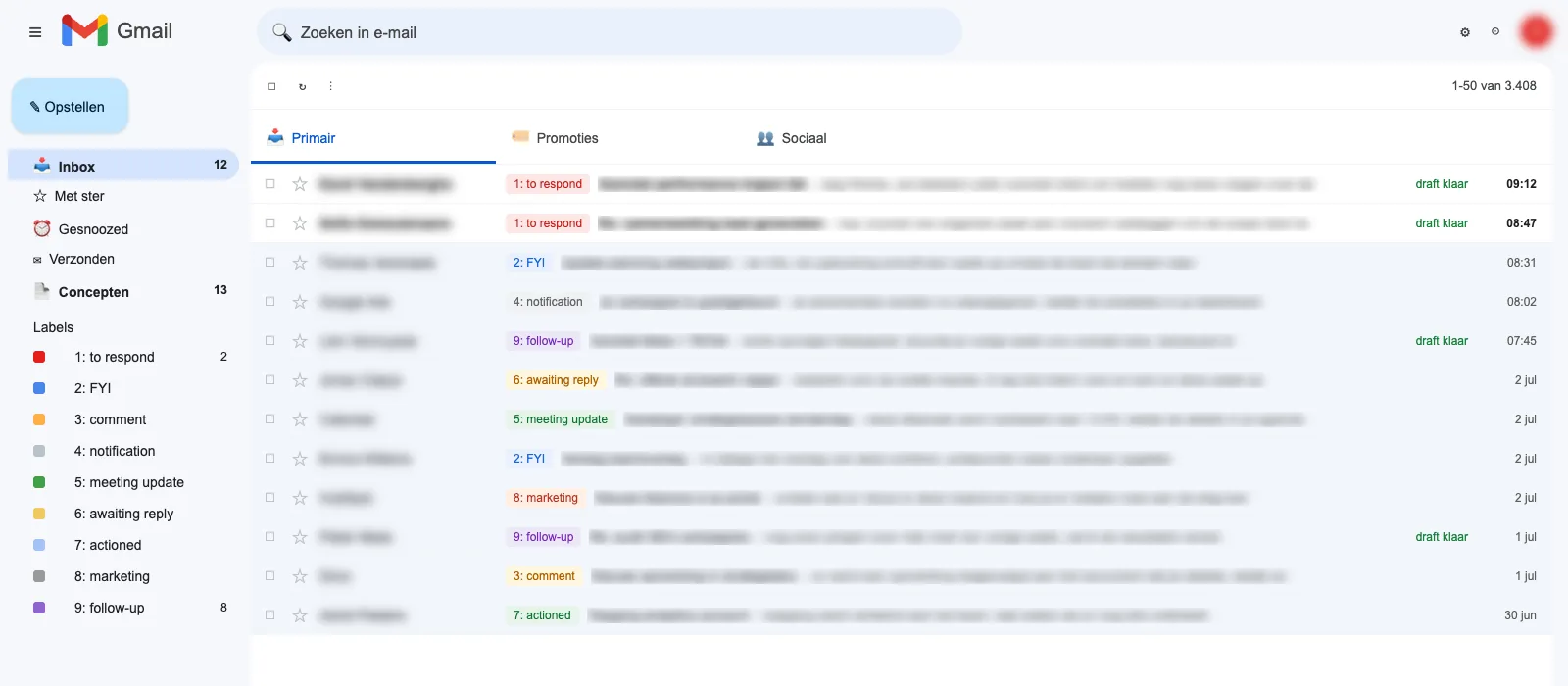
A Gmail inbox after triage: every mail labeled into numbered categories, drafts ready, senders and subjects blurred
This morning, 07:58. Every mail labeled, drafts waiting. Senders blurred, obviously.
what your mornings look like

The assistant works before you wake up.

EVERY 5 MIN

Labels + drafts

Every incoming mail sorted into 8 categories. Anything that needs an answer gets a draft in your own writing style, signature included.

07:00

Meeting prep

A briefing per external meeting today: last status, what you promised, suggested talking points. Dug out of your own mail history.

07:45

Follow-up chaser

Sent mails that got no reply for 3+ days get a polite nudge drafted, in your tone. Proposals stop dying in silence.

07:55

Phone briefing

One Telegram message: who is waiting on you, which drafts are ready. Inbox overview without opening Gmail.

22:30

It learns your voice

Every night it compares its drafts against what you actually sent, and distills style rules from your edits. The more you correct, the less you correct.

ALWAYS

Drafts only

It never sends a single mail by itself. You stay the last click on everything. That rule is welded into the framework.

the architecture

Five layers. this part is free, take it

LayerWhat it doesWhenModel logic
1TriageLabels every mail into 8 categories, drafts replies in your toneevery 5 minsmall model classifies, big model writes
2Follow-up nudgerChases your unanswered sent mail after 3 to 14 daysdaily, morningsmall model judges, big model writes
3Style learnerDiffs drafts vs what you sent, distills style rulesnightlybig model
4Command centerMorning pulse + real-time pings on your phonedaily + liveno LLM, pure data
5Meeting prepBriefing per external meeting from your mail historydaily, 07:00big model

Cost logic: classifying is easy, so the cheapest model does it. Writing in your voice is hard, so the strong model does that. Typical running cost: a few dollars a month.

the part most people skip

Six rules that matter more than the prompts. also free

1

Never auto-send.

Everything stays a draft. The human clicks send. This is the rule that makes the whole system safe, and the reason you can let it run unattended.

2

Hard rules before the LLM.

If you are only in Cc, it is FYI by definition; no model call needed. Everything you can enforce in code, you enforce in code.

3

Idempotent by design.

A labeled thread is skipped. A thread with a draft never gets a second one. That is what lets the script run blind every five minutes.

4

Tone of voice from your own sent mail.

No persona descriptions. Ten recent sent mails as samples in the prompt, refreshed twice a day. The model imitates what it sees.

5

Attach the signature yourself.

Gmail only injects your signature in the web UI, not on API drafts. Read it from the API and append it after the generated body. Nobody tells you this.

6

Caps everywhere.

Max 5 nudges per run, one nudge ever per thread, max 4 meeting briefs a day. An assistant that spams is worse than no assistant.

The six full prompts + the master build prompt are the paid part. Fair split, right?

the math

A one-time buy that pays itself back in time.

Say email eats an hour of your day and this framework wins half of it back: triage done, replies pre-written, follow-ups chased, meetings prepped. That is roughly 2.5 hours a week, every week, for a one-time $49.

The subscription tool this replaces charges around $30 a month, forever, and reads your mail on someone else's server while doing it.

$49 once
Subscription tool, year one~$360
This framework, year one$49 + API costs
Time back at ~30 min/day~2.5 h/week
Pays for itself before the weekend ↩
Get the framework, $49
inside the download

Everything you need. Nothing you don't.

The full framework (markdown + PDF): 5 layers, the 6 rules, all six core prompts with placeholders
The master build prompt: paste it into Claude Code and it builds, tests and schedules the whole thing with you
SETUP.md: foolproof walkthrough from zero, for both the Claude Code terminal and the desktop app, including the Google Cloud and Microsoft Entra steps click by click
Troubleshooting FAQ: the 14 snags people actually hit, and the fixes
Scheduling templates: launchd for macOS, cron for Linux, env template for your keys
Security checklist: the gotchas that cost evenings, including the one that silently kills scheduled jobs on macOS
Lifetime updates: every 1.x release lands in your inbox, re-download included
30-day refund, no questions asked
Get the framework, $49
honest expectations

You will run scripts. Twice.

This is a framework, not an app. You build the assistant yourself with Claude Code doing the heavy lifting. If pasting a prompt and answering its questions sounds doable, you are the audience. First layer runs in one evening.

What you need before you start
  • Claude Code (terminal or desktop app) with a Claude subscription: this builds the assistant
  • An Anthropic Console API key with billing: this runs the assistant, budget $2 to $10 a month at typical mail volume
  • A Gmail account, or a Microsoft 365 / Outlook.com mailbox
  • A free Google Cloud project (Gmail path) or Entra app registration (Microsoft path); SETUP.md walks you through every click of either
  • A Mac or Linux machine that is regularly on
  • Optional, for the phone briefings: a free Telegram bot
The two Claude things are different: a subscription builds it, an API key runs it. The setup guide will not let you mix them up.
the damage

You could reverse-engineer all of it in three or four evenings. This is those evenings, already spent.

No subscription,
ever
$49
Once. That's the whole trick.
  • The complete Inbox Trick framework (v1.0)
  • Master build prompt for Claude Code
  • Foolproof setup guide + troubleshooting FAQ
  • launchd + cron templates, security checklist
  • Lifetime updates (every 1.x release), delivered to your inbox
Get the framework, $49

30-day no-questions refund. Instant digital download: the prompts, the build prompt, the setup guide. Not an app. VAT and invoice handled at checkout by Gumroad.

questions people ask

FAQ

Does my mail leave my machine?

Only as the Claude API calls your assistant sends itself, under your own API key, covered by Anthropic's API terms. Everything else runs locally on your own computer. No SaaS in the middle, no third party with mailbox access, no data stored on anyone's server for you.

Do I need to be a developer?

No. You need to be comfortable pasting a prompt into Claude Code and answering its questions. The master build prompt does a preflight check, builds everything, shows you dry-run results, and only schedules things after you approve them. The setup guide assumes zero prior knowledge.

What does it cost to run?

Roughly $2 to $10 a month in Claude API usage at a typical mail volume, on top of the Claude subscription you already have for Claude Code. Most calls hit the cheapest model; the expensive one only fires when a draft is actually needed. You can set a hard spend cap in the Anthropic console.

How long does setup take?

The Google Cloud part takes about 15 minutes with the guide. The first layer (triage + drafts) typically runs the same evening. The other four layers are add-ons you bolt on whenever you feel like it.

Does it work with Outlook? And Apple Mail?

Gmail and Microsoft 365 / Outlook.com are both supported; the setup guide has a walkthrough for each. Apple Mail is a mail client, not a provider: if your account underneath is Gmail or Microsoft 365, the drafts your assistant writes simply appear inside Apple Mail. Only pure iCloud mailboxes are out, there is no API worth building on. Honest note: the Gmail path is the battle-tested one; the Microsoft path is built by Claude Code from the same architecture.

Windows?

The assistant needs a machine that is regularly on, running macOS or Linux (launchd or cron). Windows users can run it under WSL, but the guide does not hold your hand there.

What if I get stuck?

The package includes a troubleshooting FAQ with the 14 issues people actually hit, including the obscure macOS one that silently kills scheduled jobs. There is no 1:1 support at this price, and the guide is written so you should not need it.

Isn't there a free open-source tool for this?

There is: Inbox Zero is a solid open-source app with similar features. Self-hosting it means running a Next.js app with Postgres and Redis (a developer weekend), and the easy route is their paid hosted plan, a subscription. This framework is a different job: you build your own assistant inside Claude Code, in your own account, in your own voice, extend it with any rule you want, and nobody can price-hike it later.

Couldn't I just prompt Claude Code to build this myself?

You could, and that is exactly why this is a framework and not an app. What you are buying is the map: the prompts that survived thousands of real mails, the label taxonomy that does not confuse the classifier, the signature gotcha, the scheduler trap that silently kills jobs on macOS. Reverse-engineering that takes three or four evenings. This is those evenings, already spent, for $49. If you would rather spend the evenings, the free rules above will get you started.

What about updates?

Free updates for the lifetime of the product line: every 1.x release is included. When the framework improves, you get an email and the new version appears behind your original Gumroad download link. No fixed schedule; updates ship when they are ready.

Refunds?

30 days, no questions asked, handled by Gumroad. If you read it and it is not for you, you get your money back.
why this exists

Built because the ads annoyed me.

The tool this replaces kept stalking my feeds, so one evening I rebuilt it with Claude Code instead of subscribing. Then it got interesting: a tool you rent stays whatever the vendor makes it. A system you own grows a new layer every week. Mine chases my unanswered proposals, preps my meetings and learns from every draft I edit.

This framework is the write-up I wish existed that first evening: the architecture, the rules that keep it safe, and every prompt, cleaned up and battle-tested on thousands of real mails.

Build it, make it yours, and draw outside the lines.

Get the framework, $49